Pay with USDC

Purchase a Laevitas subscription, tick-data files, API credits or a streaming pass with USDC on Base or Solana. Payments use x402, with verification and settlement handled by PayAI.

Tick-data files, paid with USDC

Buy historical Parquet datasets with USDC on Base or Solana. Choose the data type, exchange, currencies and dates in V3, then select Pay with USDC. Review the exact file selection and price before approving your wallet. Free accounts can purchase data; no subscription or API credit bundle is required.

USDC on Base USDC on Solana One purchase for your selected dataset

Trades, books & snapshotsBrowse the live catalog for available spot and derivatives data, including trade prints, order books, liquidations and options snapshots. Coverage varies by data type, exchange and currency.

Exact quote before paymentPricing follows your selected data types, currencies and file-days. The quote shows gaps and the total before you sign. Public discovery prices are starting rates, not unlimited history.

Ready for researchDownload Parquet files for your own analysis and backtests. Orders retain their payment receipt, delivery status and available downloads in V3.

Buy tick data Explore the x402 catalog ↗

Orders belong to the Laevitas account signed in at checkout. Smaller exports use ZIP delivery; larger datasets use manifests and protected per-file downloads. Packaging retries, status checks and refreshing download links within the order’s retention window do not charge again. If delivery fails, use the existing order’s retry or contact support with its reference.

Purchase through the API or an agent

Payable resource: POST https://apiv2.laevitas.ch/api/v1/x402/tick-data/purchase. Catalog, quote, status and download routes support this purchase; they do not each require a new payment.

Discover tick data in the live catalog, OpenAPI and x402 discovery. Public probes show a starting per-currency day rate, not the cost of an entire dataset.

For account-backend requests to be.laevitas.ch, include Referer: https://v3.laevitas.ch/ for the dashboard edge policy, plus the account bearer token wherever required. Dev uses be.devitas.ch and Referer: https://demo.devitas.ch/. The Referer header is not account authentication.

  1. Read GET https://be.laevitas.ch/data-export/catalog. Discover currencies and available dates with its /currencies and /coverage routes.
  2. Quote at POST https://be.laevitas.ch/data-export/quote with {"items":[{"dataType":"options-trades","exchange":"deribit","currency":"BTC","from":"2026-09-01","to":"2026-09-01"}]}. This step is free and does not submit a payment.
  3. Send the returned quoteId to POST https://be.laevitas.ch/data-export/x402/checkouts with the buyer’s Laevitas account bearer token. Review any unavailable dates before explicitly setting acceptUnavailableData: true. Retrying the same quote resumes the same order. An API key or a wallet address alone is not account authentication.
  4. Use the returned paymentUrl with {"checkoutId":"…"} and X-Checkout-Token. A request without a signature returns the exact USDC challenge. Sign one accepted network and send the signature once in PAYMENT-SIGNATURE.
  5. After an interrupted response, poll the checkout statusUrl; never replay the signature. paid means funds are confirmed, while active means the order has been handed to delivery. File preparation can still be in progress.
  6. Poll GET https://be.laevitas.ch/data-export/orders/{dataOrderId} using the account bearer token. When ready, use the existing /download-url, /manifest, /files and per-file download routes. Status and downloads are not new x402 purchases.

To reopen a checkout, send an authenticated POST /data-export/x402/checkouts/{id}/resume. This rotates the checkout token; it does not charge. Confirmed unused/expired authorizations return not_settled; refresh the dataset quote before starting over.

Premium & Enterprise subscriptions

Buy the same plans available by card, directly from your wallet. Choose monthly, quarterly, 6-month or yearly access. Each purchase is prepaid; there is no automatic renewal or recurring wallet debit.

USDC on Base USDC on Solana
Subscription plans payable with USDC
PlanMonthly priceAccess
Premium50 USDCPremium dashboard features and plan limits.
Enterprise500 USDCEnterprise dashboard and API access. History and request limits follow your plan and period.

Checkout shows current prices for every period and applies any eligible unused subscription credit. Review the final USDC amount, network and access dates before approving payment.

Subscribe with USDC

Buy from the dashboard

  1. Sign in. Use your existing Laevitas account, or choose “Continue with wallet” to create an account without an email.
  2. Choose your plan and period. Open USDC checkout, then select Premium or Enterprise and your billing period.
  3. Connect a supported wallet. Choose Base or Solana and connect MetaMask, Phantom or another wallet shown in checkout. Use USDC on the selected mainnet.
  4. Review and pay. Approve the quoted payment in your wallet. Once confirmed, the subscription and payment receipt appear in your account.
Which account owns the subscription?

The account signed in at checkout owns the subscription. If you already use email or Google, sign in to that account first. You can explicitly link your wallet for sign-in to return to the same account and subscription. Paying with a wallet alone does not link it for sign-in.

How do renewals and card subscriptions work?

Renew by purchasing another prepaid period. A same-plan renewal adds time to your remaining access. If you have automatic card billing, checkout asks for your consent before switching to prepaid billing and stopping card renewal after a successful payment. Your quote shows the resulting access dates and any credit.

How do I use my Enterprise API access?

After activation, open Subscription → API Key in V3 to generate or manage your key, then send it in the X-API-Key header. This also works for accounts created with a wallet. Premium does not include Enterprise API rights. API credit bundles and streaming passes are separate products, not subscription balances.

What if payment confirmation is interrupted?

Reopen checkout or use “Check status” for the saved purchase. Do not send a second payment while confirmation is pending. If it remains pending, contact [email protected] with the checkout ID and transaction reference. Never share your private key or recovery phrase.

For API clients and agents

Discover the eight plan/period offers through the live product catalog, OpenAPI, x402 discovery, or our x402scan catalog. Reading product prices does not submit a payment.

  1. Create an account-bound quote at POST https://be.laevitas.ch/subscription/x402/quotes using a Laevitas account bearer token. Send the catalog’s planId, cycle and a new requestId UUID. Use the same request ID when retrying that quote. An API key or wallet address alone is not account authentication. If checkout requires a switch from card billing, obtain the user’s consent before setting switchToPrepaid: true.
  2. Use the returned checkout ID, checkout token and payment URL. Send X-Checkout-Token to request the exact 402 payment terms. Public purchase URLs advertise list prices; only an account-bound quote authorizes checkout.
  3. After reviewing the quote, use an x402 v2 client to sign one accepted USDC payment on Base or Solana. Submit it with PAYMENT-SIGNATURE and the same checkout token. Purchase URLs also require a JSON body containing checkoutId.
  4. A 200 response with state: active confirms access. A 202 or interrupted response means poll the returned statusUrl with X-Checkout-Token. Do not create or pay another checkout while the first is pending.

Keep account and checkout tokens private. Product permissions, prices, account eligibility and any switch from card billing are decided by Laevitas; x402 handles the payment.

Pay for API data without a subscription

1

Request Data

Call any paid REST or MCP endpoint without an API key. The server responds with HTTP 402 and payment details.

2

Pay with USDC

Your wallet signs a USDC payment on Base or Solana. The transaction is verified by the x402 facilitator.

3

Get Data

Payment verified instantly. Your data is returned in the same HTTP response. No waiting, no accounts.

The x402 Protocol

x402 brings the HTTP 402 Payment Required status code to life. Originally reserved in the HTTP spec in 1997 for "future use," it was never standardized — until now. Built by Coinbase, x402 turns every API call into a pay-as-you-go transaction using USDC stablecoins.
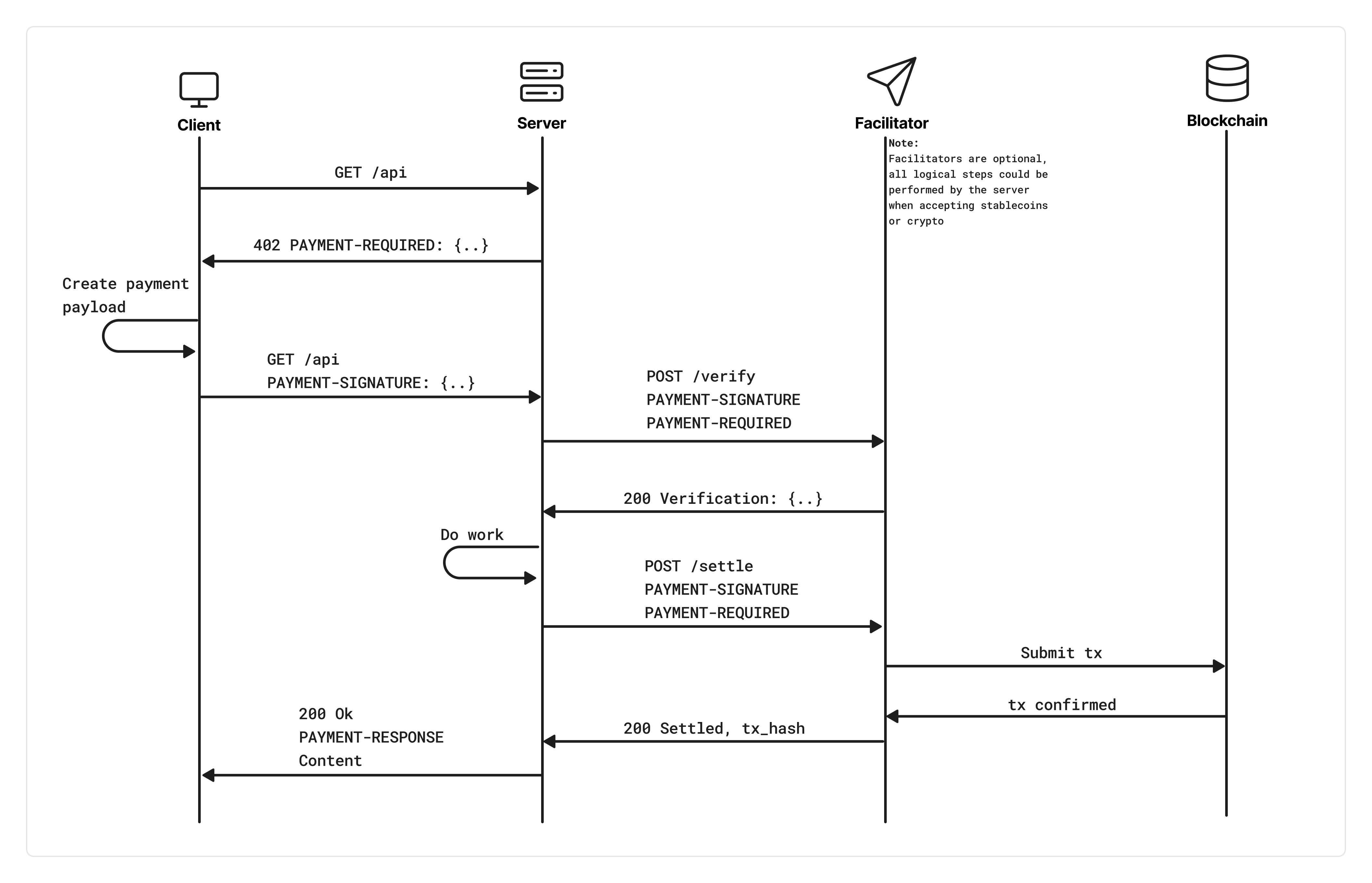
x402 Protocol Flow — Client, Resource Server, and Facilitator interaction

The client sends a request, the resource server responds with 402 and payment requirements, the client signs a USDC payment, and the facilitator verifies & settles on-chain before the server returns the data.

Why We Bundle 100 Calls, Not Pay Per Request

The economics of on-chain micropayments make per-request settlements impractical. Here's why credit bundles are the right design.

The Per-Request Problem

Every on-chain transaction — no matter how small — carries a fixed gas cost. On Base L2, this is roughly $0.001–$0.01 per transaction. Our API charges $0.001 per request. That means the gas fee alone can be equal to or greater than the data you're paying for.

If a quant needs 100 OHLCV candles to backtest a strategy, naive per-request x402 would mean 100 separate blockchain transactions — each with its own gas fee, each adding 2–5 seconds of on-chain settlement latency. The gas overhead alone could exceed the total cost of the data by 5–10x.

100 calls × $0.005 gas = $0.50 in gas to access $0.10 worth of data. That's a 5x overhead.

Beyond cost, there's latency. Each settlement takes 2–5 seconds for the facilitator to verify and submit on-chain. For a trading bot that needs to poll data every few seconds, waiting for a blockchain confirmation per call is a non-starter.

Our Solution: Prepaid Credit Bundles

Instead of settling every single request on-chain, we batch payments into credit bundles. You pay once for a bundle of 100 API calls ($0.10 in USDC), and the server credits your wallet with 99 prepaid requests. Those 99 subsequent calls are served instantly from an in-memory credit ledger — no blockchain, no gas, no latency.

1
On-chain transaction
per 100 calls
~1ms
Credit deduction latency
(atomic, server-side)
99%
Less gas overhead
vs per-request

Credits are tracked server-side with atomic deductions and a persistent audit trail. If the server restarts, credits are restored automatically. Your balance is never lost.

Solana support: On Solana, transaction costs are even lower (~$0.00025) with 400ms finality — but bundles still save 99% of on-chain interactions and eliminate all settlement latency for credit calls.

Cost Breakdown: 100 API Calls

Metric Per-Request Bundle (100)
Data cost 100 × $0.001 = $0.10 100 × $0.001 = $0.10
Gas fees 100 × ~$0.005 = $0.50 1 × ~$0.005 = $0.005
Total cost $0.60 $0.105
Effective cost per call $0.006 $0.00105
Latency per call 2–5 seconds ~1ms (99 of 100 calls)
On-chain transactions 100 1
Gas savings — ~$0.495 saved (99%)

Comparative Analysis: API Access Methods

How does x402 with credit bundles compare to traditional API access models?

Feature API Key x402 Per-Call x402 + Bundles
Signup required Yes (wallet or email account) No No
Payment model Monthly subscription USDC per request USDC per bundle
Latency overhead ~0ms 2–5s per call ~1ms (after first call)
Privacy Account; email optional Wallet only Wallet only
Gas overhead None High (per call) Minimal (per bundle)
AI agent friendly Needs key management Native wallet signing Native + fast credits
Cost for 1,000 calls Plan-dependent ~$6.00 ~$1.05
Best for High-volume production One-off queries Regular usage, bots, agents

What x402 Unlocks

Autonomous AI Agents

AI agents can access market data by paying directly from their wallet. No API key provisioning, no human in the loop. An agent with a funded wallet can discover endpoints, pay for data, and make trading decisions — all programmatically.

Zero-Identity Access

No email, no signup, no API key management. Your wallet address is your only identity. Perfect for privacy-conscious traders and researchers who want data without creating accounts.

True Pay-As-You-Go

No monthly minimums, no unused quota. You pay for exactly what you consume. Need 10 calls this month and 10,000 next month? The cost scales linearly — no plan upgrades or downgrades.

Instant Onboarding

Go from zero to live data in seconds. Fund your wallet with USDC on Base or Solana, call the endpoint, and you're in. No approval process, no email verification, no waiting for API keys to be provisioned.

Prepaid Credit Bundles

Pay once for multiple API calls. After the first on-chain payment, subsequent requests are served instantly from prepaid credits (~1ms, no blockchain transaction).

1

First call without API key

Server responds with 402 Payment Required and payment details

2

Client signs USDC payment

Wallet signs an EIP-712 message authorizing the USDC transfer. Sent as PAYMENT-SIGNATURE header.

3

Server verifies and settles on-chain

PayAI settles the payment. Wallet is credited with N-1 prepaid calls.

4

Response includes credit token

Headers: x-credit-token (JWT) + x-credits-remaining

5

Subsequent calls: send credit token

Set X-Credit-Token header. Instant access (~1ms), credits decremented server-side.

6

Credits exhausted?

Next call returns 402 again. Pay for a new bundle and repeat.

7

Token lost or expired (24h)? Refresh it without paying

Credits stay on the paying wallet. POST /api/v1/x402/credit-token/challenge with {"address","chain_id"} returns a Sign-In-With-X message; sign it as a plain message with that wallet and send the info fields plus address and signature to POST /api/v1/x402/credit-token. You receive a fresh token. The signature authorizes no payment and no credit is spent.

Streaming Passes (WebSocket)

Beyond pay-per-request REST, x402 also covers WebSocket streaming via prepaid time slots. Buy a pass with a single payment, then connect to wss://apiv2.laevitas.ch/ws with the returned credit token. No metering, no per-event billing — you reserved the time.

1-hour pass
$0.50
POST /api/v1/x402/ws-pass/hour
1-day pass
$10.00
POST /api/v1/x402/ws-pass/day

How it works

1

POST to a pass route

Server returns 402 Payment Required with USDC payment instructions.

2

Sign & retry with payment header

Server settles on-chain, grants your slot, and returns x-credit-token (JWT scoped to your wallet).

3

Connect to WebSocket with the credit token

Send the JWT as X-Credit-Token on the handshake. Disconnect and reconnect freely until the slot expires.

4

Pass expired? Buy another

When your slot ends, the connection closes with code 4006 NO_ACTIVE_PASS. Buying additional passes while one is active extends your remaining time additively.

When to use what

Use case Best fit
Sporadic REST queries (a few hundred a day) Credit bundles ($0.10 / 100 calls)
Short streaming burst (testing, evaluation) Hour pass ($0.50)
Daily streaming (a few hours, every day) Day pass ($10.00)
Always-on streaming or heavy historical access API subscription ($500/month)

Full WebSocket protocol details, channel patterns, close codes, and reconnect best practices: /websocket.

API credits: quick start

Install the x402 client libraries and pick your chain. The @x402/fetch wrapper handles the entire 402 flow automatically — payment signing, retry, and credit token management.

1. Install dependencies

# EVM (Base) — uses viem for wallet signing
npm install @x402/fetch @x402/evm viem

# Solana — uses @solana/kit for keypair signing
npm install @x402/fetch @x402/svm @solana/kit @scure/base

2. Choose your chain

import { x402Client, wrapFetchWithPayment } from '@x402/fetch';
import { registerExactEvmScheme } from '@x402/evm/exact/client';
import { privateKeyToAccount } from 'viem/accounts';

// Your EVM private key (0x-prefixed hex)
const EVM_PRIVATE_KEY = process.env.EVM_PRIVATE_KEY;

const client = new x402Client();
const signer = privateKeyToAccount(EVM_PRIVATE_KEY);
registerExactEvmScheme(client, { signer });

console.log(`Wallet: ${signer.address}`);

const fetchWithPayment = wrapFetchWithPayment(fetch, client);

// First call pays on-chain ($0.10 for 100-call bundle)
const response = await fetchWithPayment(
  'https://apiv2.laevitas.ch/api/v1/perpetuals/catalog?exchange=deribit'
);
const data = await response.json();

// Save the credit token for subsequent calls (instant, no gas)
const creditToken = response.headers.get('x-credit-token');
const remaining = response.headers.get('x-credits-remaining');
console.log(`Credits remaining: ${remaining}`);

// Subsequent calls — use credit token (no on-chain tx, ~1ms)
const next = await fetch(
  'https://apiv2.laevitas.ch/api/v1/perpetuals/catalog?exchange=deribit',
  { headers: { 'X-Credit-Token': creditToken } }
);

3. cURL (manual flow)

# Step 1: Request without auth — get 402 + payment details
curl -i https://apiv2.laevitas.ch/api/v1/perpetuals/catalog \
  -G -d "exchange=deribit"
# Response: 402 with payment-required headers

# Step 2: After payment, use the credit token for instant access
curl https://apiv2.laevitas.ch/api/v1/perpetuals/catalog \
  -H "X-Credit-Token: eyJhbGciOi..." \
  -G -d "exchange=deribit"
# Response: 200 with data + x-credits-remaining header

API credit pricing

Price per request $0.001 USDC
Currency USDC (USD Coin)
Bundle example 100 calls = $0.10 per payment
Networks Base (eip155:8453) + Solana (solana:mainnetBeta)
Testnets Base Sepolia + Solana Devnet
Tx cost (gas) Base ~$0.005 · Solana ~$0.00025
Facilitator PayAI (Base + Solana)
Credit token lifetime 24 hours
Eligible endpoints /futures/* /perpetuals/* /options/* /vol-surface/* /vol-surface/risk/* /predictions/* /hyperliquid/* /mcp

Response Headers

Header When Description
x-credit-token After on-chain payment JWT identifying your wallet. Send as X-Credit-Token header for subsequent calls.
x-credits-remaining Every credit-spend call Number of prepaid credits remaining in your wallet.
x-402-* 402 response Payment requirements including amount, network, and receiving wallet address.

Supported Networks

Base Mainnet

PRODUCTION

Primary EVM network for production payments.

Network: eip155:8453
Currency: USDC (ERC-20)
Tx cost: ~$0.001–$0.01

Base Sepolia

TESTNET

EVM testing with testnet USDC.

Network: eip155:84532
Currency: USDC (testnet)

Solana Mainnet

PRODUCTION

Ultra-low fees, 400ms finality.

Network: solana:5eykt4UsFv8P8NJdTREpY1vzqKqZKvdp
Currency: USDC (SPL)
Tx cost: ~$0.00025

Solana Devnet

DEVNET

Solana testing with devnet USDC.

Network: solana:EtWTRABZaYq6iMfeYKouRu166VU2xqa1
Currency: USDC (devnet)

Frequently Asked Questions

x402 is an open payment protocol built on the HTTP 402 "Payment Required" status code. It enables programmatic USDC payments over HTTP. At Laevitas, you can use it to buy a prepaid subscription, tick-data files, API credits or a streaming pass.

For Base (EVM): any wallet that can sign EIP-712 typed data — MetaMask, Coinbase Wallet, Rainbow, or programmatic wallets using viem / ethers.js. For Solana: any wallet that can sign transactions — Phantom, Solflare, or @solana/web3.js. You need USDC on whichever chain you choose.

Your next API call returns a 402 Payment Required response. If you're using @x402/fetch, it handles this automatically — a new payment is signed and submitted, and you receive a fresh bundle of credits.

Yes. x402 is an alternative authentication method. If you send a valid apikey header, the request is authenticated normally and no payment is required. x402 only activates when no API key is present on paid API surfaces.

An interrupted response does not prove that a transfer failed. For subscriptions and tick-data orders, reopen the saved checkout and use “Check status”; do not submit another payment while confirmation is pending. For API purchases, retain the original payment reference and follow the response’s retry instructions. Contact [email protected] if the payment remains unresolved.

Credits are tracked server-side with fast atomic deductions and a persistent record. When you send a payment signature, the server extracts your wallet address and checks for existing credits before settling on-chain. If you already have credits, the payment is skipped and a credit is deducted instead.

Yes. We support both Base (EVM) and Solana for USDC payments. The server advertises both networks in the 402 response, and your client library chooses which chain to pay on based on your wallet type. Credit bundles work identically on both chains.

Solana offers the lowest transaction fees (~$0.00025) and fastest finality (~400ms), ideal for high-frequency or cost-sensitive use cases. Base is best if you're already in the EVM ecosystem and prefer using EVM wallets and tooling. Both chains use USDC and support the same credit bundle system.

Resources